MindStudio Kernel Launcher工具用户指南
简介
MindStudio Kernel Performance Prediction(算子调用工具,msKL)具有调用msOpGen算子工程和基于Ascend C模板库进行自动调优的功能,具体介绍如下:
- 调用msOpGen算子工程功能介绍:msKL工具提供的tiling_func和get_kernel_from_binary接口,可以直接调用msOpGen算子工程。
- 自动调优功能介绍:msKL提供模板库Kernel下发代码生成、编译、运行的能力,同时提供Kernel内代码替换并自动调优的能力。
使用前准备
环境准备
进行算子开发之前,需要安装驱动固件和CANN Toolkit软件包以及ops算子包,请参见《CANN 软件安装指南》。本节不再给出安装示例。完成相关环境变量的配置后,可直接使用Kernel轻量化调用的功能。
约束
- 出于安全性及权限最小化角度考虑,本代码仓中的工具均不应使用root等高权限账户进行操作,建议使用普通用户权限安装执行。
- 使用算子开发工具前,请确保执行用户的umask值大于等于0027,否则会造成获取的性能数据所在目录和文件权限过大。
- 使用算子工具前,请保证使用最小权限原则(如:禁止other用户可写,禁止666或777)。
- 不建议配置或运行其他用户目录下的自定义脚本,避免提权风险。
-
下载代码样例时,需执行以下命令指定分支版本。
调用msOpGen算子工程功能介绍
功能说明
当前部分算子开源仓采用了msOpGen提供的工程模板。然而,基于此模板进行算子调用较为复杂,且难以实现算子的轻量化调测。为了解决此类问题,我们可以利用msKL工具提供的tiling_func和get_kernel_from_binary接口,直接调用msOpGen工程中的tiling函数以及用户自定义的Kernel函数。
注意事项
- 使用本功能时,算子输入输出仅支持numpy.Tensor、torch.Tensor。
- 若CANN中曾经部署过相同类型的算子(op_type),用户修改了tiling函数并重新编译,则需要在CANN环境中重新部署该算子。
-
调用tiling_func和get_kernel_from_binary接口时,系统会在当前目录下的mindstudio_mskl_gen文件夹中生成以下中间文件,该文件仅供开发定位使用,用户无需关注。请勿修改该文件夹及其子文件的内容,以免造成工具功能异常。
(p39) root@ubuntu:~/project/add_custom/CustomOp$ ll mindstudio_mskl_gen/
total 388
drwxr-x---  2 root root    314 Jul 24 09:40 ./
drwxr-x--- 10 root root   4096 Jul 24 09:40 ../
-rw-------  1 root root  13042 Jul 24 09:40 _mskl_gen_binary_launch.1.cpp
-rw-------  1 root root  13231 Jul 24 09:40 _mskl_gen_binary_launch.2.cpp
-rw-------  1 root root  26640 Jul 24 09:40 _mskl_gen_binary_module.1.so
-rw-------  1 root root  26640 Jul 24 09:40 _mskl_gen_binary_module.2.so
-rw-------  1 root root   4878 Jul 24 09:40 _mskl_gen_tiling.1.cpp
-rw-------  1 root root 141432 Jul 24 09:40 _mskl_gen_tiling.1.so
-rw-------  1 root root   5127 Jul 24 09:40 _mskl_gen_tiling.2.cpp
-rw-------  1 root root 141432 Jul 24 09:40 _mskl_gen_tiling.2.so
使用示例
本章节以matmulleakyrelu算子工程为例,介绍如何利用msKL工具提供的tiling_func和get_kernel_from_binary接口调用msOpGen工程中的tiling函数以及用户自定义的Kernel函数,其他类型的算子操作均可参考此流程进行操作。
- 请参考使用前准备,完成相关环境变量的配置。
-
点击链接获取样例工程,为进行算子检测做准备。
[!NOTE]
- 本样例工程以Atlas A2 训练系列产品/Atlas A2 推理系列产品为例。
- 下载代码样例时,需执行以下命令指定分支版本。
具体操作
-
参见环境准备中的样例工程,运行
${git_clone_path}/operator/ascendc/0_introduction/12_matmulleakyrelu_frameworklaunch目录下的install.sh脚本,生成自定义算子工程,并进行Host侧和Kernel侧的算子实现。 -
切换至自定义算子工程目录。
-
编辑算子拉起脚本matmulleakyrelu.py。
import numpy as np import mskl # 这个函数的入参必须和Kernel函数的入参一致 def run_kernel(input_a, input_b, input_bias, output, workspace, tiling_data): kernel_binary_file = "MatmulLeakyreluCustom.o" #不同的硬件和操作系统展示的.o文件的名称稍有不同,具体路径请参考《msopgen_usr_guide》中的“查看算子仿真图”章节里“参数说明”表 -reloc参数 kernel = mskl.get_kernel_from_binary(kernel_binary_file, 'mix') return kernel(input_a, input_b, input_bias, output, workspace, tiling_data) if __name__ == "__main__": # input/output tensor M = 1024 N = 640 K = 256 input_a = np.random.randint(1, 10, [M, K]).astype(np.float16) input_b = np.random.randint(1, 10, [K, N]).astype(np.float16) input_bias = np.random.randint(1, 10, [N]).astype(np.float32) output = np.zeros([M, N]).astype(np.float32) # shape info inputs_info = [{"shape": [M, K], "dtype": "float16", "format": "ND"}, {"shape": [K, N], "dtype": "float16", "format": "ND"}, {"shape": [N], "dtype": "float32", "format": "ND"}] outputs_info = [{"shape": [M, N], "dtype": "float32", "format": "ND"}] attr = {} # 调用tiling函数 tiling_output = mskl.tiling_func( op_type="MatmulLeakyreluCustom", inputs_info=inputs_info, outputs_info=outputs_info, # 可选 inputs=[input_a, input_b, input_bias], outputs=[output], attr=attr, # 可选 lib_path="build_out/op_host/libcust_opmaster_rt2.0.so", # tiling代码编译产物,具体位置可参考《msopgen_usr_guide》中的“算子包部署>步骤2以默认安装场景为例”中的目录结构 # soc_version="", # 可选 ) blockdim = tiling_output.blockdim workspace_size = tiling_output.workspace_size tiling_data = tiling_output.tiling_data # numpy数组 workspace = np.zeros(workspace_size).astype(np.uint8) # workspace需要用户自行申请 # 调用Kernel函数 run_kernel(input_a, input_b, input_bias, output, workspace, tiling_data) # 校验输出 alpha = 0.001 golden = (np.matmul(input_a.astype(np.float32), input_b.astype(np.float32)) + input_bias).astype(np.float32) golden = np.where(golden >= 0, golden, golden * alpha) is_equal = np.array_equal(output, golden) result = "success" if is_equal else "failed" print("compare {}.".format(result)) -
运行脚本。
[!NOTE]
若脚本执行失败,报如下错误:
Exception: Check kernel_binary_file /XXX/samples/operator/ascendc/0_introduction/12_matmulleakyrelu_frameworklaunch/CustomOp/MatmulLeakyreluCustom.o permission failed.则说明 CustomOp 目录下没有自动生成 MatmulLeakyreluCustom.o 文件,需要手动寻找一下编译结果。执行以下命令寻找.o文件位置:
得到的结果类似如下:
./build_out/op_kernel/ascendc_kernels/binary/ascend910b/matmul_leakyrelu_custom/MatmulLeakyreluCustom_97ef75830e63ebe749e7c029d8d403c5.o此时需要将该.o文件手动拷贝到 CustomOp 目录,执行以下命令(请替换成实际路径):
cp ./build_out/op_kernel/ascendc_kernels/binary/ascend910b/matmul_leakyrelu_custom/MatmulLeakyreluCustom_97ef75830e63ebe749e7c029d8d403c5.o ./MatmulLeakyreluCustom.o拷贝完成后,再执行 matmulleakyrelu.py 脚本运行算子:
输出说明
输出如下结果,说明算子运行正常:
自动调优功能介绍
功能说明
在进行模板库算子开发时,利用msKL提供的接口在Python脚本中快速实现Kernel下发代码生成、编译及运行Kernel。
在对模板库算子进行性能调优时,通常需要对Kernel的模板参数(比如L0shape大小)进行多次调整并对比性能结果。为提升调优效率,msKL工具提供了autotune系列接口支持开发者可以高效地针对多个调优点进行代码替换、编译、运行以及性能对比。
注意事项
- 自动调优功能仅支持Atlas A2 训练系列产品/Atlas A2 推理系列产品。
- 单Device仅支持使用单个msKL工具进行自动调优,且不推荐同时运行其他算子程序。
-
需确保先import mskl再import acl,否则需要在运行前设置环境变量。
使用示例
自动调优流程
自动调优流程包括Kernel级自动调优和应用级自动调优两种,具体流程请参见图1,具体操作请参见Kernel级自动调优样例和应用级自动调优样例。
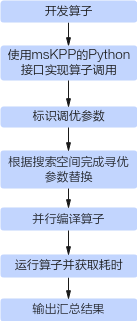
本章节以模板库catlass-v1-dev分支的examples/00_basic_matmul为例,介绍如何利用msKL工具提供的接口实现Kernel级自动调优。
[!NOTE]
在运行过程中出现任何异常,可通过设置环境变量的方式来查看debug日志以及保留中间文件,便于问题定位。下载代码样例时,需执行以下命令指定分支版本。
-
完成算子Kernel开发后,Kernel函数的定义与实现将会呈现在basic_matmul.cpp文件中,如下所示。
-
参考附录,在examples/00_basic_matmul目录中创建Python脚本文件basic_matmul_autotune.py与编译脚本文件jit_build.sh。(下述代码已经在basic_matmul_autotune.py中写好,开发者创建对应文件即可,无需再手动补充一遍)
按照如下要求,定义算子Kernel函数的Python接口:在Python脚本中定义basic_matmul函数,其入参需与C++代码中的Kernel函数保持一致。
# basic_matmul_autotune.py import mskl def get_kernel(): kernel_file = ".basic_matmul.cpp" kernel_name = "BasicMatmul" build_script = "./jit_build.sh" # kernel compile script config = mskl.KernelInvokeConfig(kernel_file, kernel_name) gen_file = mskl.Launcher(config).code_gen() kernel = mskl.compile(build_script=build_script, launch_src_file=gen_file) return kernel def basic_matmul(problem_shape, a, layout_a, b, layout_b, c, layout_c): # This function's input arguments must exactly match the kernel function. kernel = get_kernel() blockdim = 20 # use the correct aic number that matches your hardware return kernel[blockdim](problem_shape, a, layout_a, b, layout_b, c, layout_c, device_id=1) # invoke the kernel -
参考如下代码实现,构造Kernel入参,实现basic_matmul函数的正常运行。
- 若算子Kernel函数入参是GM_ADDR,则构造入参需使用numpy.array类型。
- 若算子Kernel函数入参是C++结构体对象,则需依靠ctypes.Structure在Python中构建一个相同的结构体。
# basic_matmul_autotune.py import numpy as np from ctypes import Structure, c_uint32, c_int32, c_int64 class GemmCoord(Structure): _fields_ = [("m", c_uint32), ("n", c_uint32), ("k", c_uint32)] def __init__(self, m, n, k): super().__init__() self.m = (c_uint32)(m) self.n = (c_uint32)(n) self.k = (c_uint32)(k) @staticmethod def get_namespace(): return "Catlass::" class RowMajor(Structure): _fields_ = [("shape", c_int32 * 2), ("stride", c_int64 * 2)] def __init__(self, rows : int = 0, cols : int = 0, ldm : int = None): super().__init__() self.shape = (c_int32 * 2)(rows, cols) if ldm is None: self.stride = (c_int64 * 2)(cols, 1) else: self.stride = (c_int64 * 2)((c_int64)(ldm), 1) @staticmethod def get_namespace(): return "Catlass::layout::" if __name__ == "__main__": m = 256 n = 512 k = 1024 problem_shape = GemmCoord(m, n, k) layout_a = RowMajor(m, k) layout_b = RowMajor(k, n) layout_c = RowMajor(m, n) a = np.random.randint(1, 2, [m, k]).astype(np.half) b = np.random.randint(1, 2, [k, n]).astype(np.half) c = np.zeros([m, n]).astype(np.half) basic_matmul(problem_shape, a, layout_a, b, layout_b, c, layout_c) # check if the output tensor c is consistent with the golden data golden = np.matmul(a, b) is_equal = np.array_equal(c, golden) result = "success" if is_equal else "failed" print("compare {}.".format(result)) -
运行Python脚本,获得如下提示,说明算子Kernel已可正常通过Python接口拉起。
-
在算子代码程序basic_matmul.cpp中标识需调优的参数。
在模板参数的声明代码行末尾使用// tunable标记,用于替换"="号后的代码内容。
using L1TileShape = GemmShape<128, 256, 256>; // tunable
using L0TileShape = GemmShape<128, 256, 64>; // tunable
[!NOTE]
除tunable标识的方法之外,还可以通过换行,在需要整行替换的代码行末尾使用// tunable: 别名(L0Shape)方式标记。其中,别名用于搜索空间索引。 -
通过autotune接口的configs入参定义参数搜索空间,每一类参数组合会替换算子Kernel代码中被标记的代码行,然后进行编译、运行并完成Kernel性能采集。搜索空间定义示例可参考如下所示。
[!NOTE] - 参数替换需合理,不能造成编译或运行错误。 - 参数替换原则如下(以configs中的第一行为例): 1. 先替换// tunable: L0Shape方式标记的参数,将标记代码行(MatmulShape<128, 256, 64>)整行替换为configs中的value字符串(MatmulShape<128, 256, 64>)。 2. 再替换// tunable方式标记的代码行,将"="号后的MatmulShape<128, 256, 256>替换为configs中value字符串MatmulShape<64, 64, 64>。 - 不同作用域中,可能会有两个同名的变量被声明。若两个变量均符合匹配规则时,仅第一个变量会被修改。 - 若其中一个config未匹配成功,该config对应的任务会停止并报错。但其他匹配成功的config将会成功进行参数替换。
@mskl.autotune(configs=[ # add and try your own config here for a better kernel performance {'L1TileShape': 'GemmShape<128, 256, 256>', 'L0TileShape': 'GemmShape<128, 256, 64>'}, #0 the same config as in basic_matmul.cpp {'L1TileShape': 'GemmShape<128, 256, 128>', 'L0TileShape': 'GemmShape<128, 256, 64>'}, {'L1TileShape': 'GemmShape<128, 128, 256>', 'L0TileShape': 'GemmShape<128, 128, 64>'}, {'L1TileShape': 'GemmShape<64, 128, 128>', 'L0TileShape': 'GemmShape<64, 128, 128>'}, {'L1TileShape': 'GemmShape<64, 128, 256>', 'L0TileShape': 'GemmShape<64, 128, 128>'}, {'L1TileShape': 'GemmShape<64, 128, 512>', 'L0TileShape': 'GemmShape<64, 128, 128>'}, {'L1TileShape': 'GemmShape<64, 64, 128>', 'L0TileShape': 'GemmShape<64, 64, 128>'}, {'L1TileShape': 'GemmShape<64, 64, 256>', 'L0TileShape': 'GemmShape<64, 64, 128>'}, {'L1TileShape': 'GemmShape<64, 64, 512>', 'L0TileShape': 'GemmShape<64, 64, 128>'}, {'L1TileShape': 'GemmShape<128, 128, 128>', 'L0TileShape': 'GemmShape<128, 128, 128>'}, {'L1TileShape': 'GemmShape<128, 128, 256>', 'L0TileShape': 'GemmShape<128, 128, 128>'}, {'L1TileShape': 'GemmShape<128, 128, 512>', 'L0TileShape': 'GemmShape<128, 128, 128>'}, ], warmup=1000, repeat=10, device_ids=[0]) # set kernel warmup 1000us -
执行basic_matmul_autotune.py文件运行算子,获得每种参数组合的耗时及最佳调优参数集合。以下仅展示可能的一种命令行输出结果。
# python3 basic_matmul_autotune.py
No.0: 22.562μs, {'L1TileShape': 'GemmShape<128, 256, 256>', 'L0TileShape': 'GemmShape<128, 256, 64>'}
No.1: 22.109μs, {'L1TileShape': 'GemmShape<128, 256, 128>', 'L0TileShape': 'GemmShape<128, 256, 64>'}
No.2: 17.778μs, {'L1TileShape': 'GemmShape<128, 128, 256>', 'L0TileShape': 'GemmShape<128, 128, 64>'}
No.3: 15.378μs, {'L1TileShape': 'GemmShape<64, 128, 128>', 'L0TileShape': 'GemmShape<64, 128, 128>'}
No.4: 14.982μs, {'L1TileShape': 'GemmShape<64, 128, 256>', 'L0TileShape': 'GemmShape<64, 128, 128>'}
No.5: 15.671μs, {'L1TileShape': 'GemmShape<64, 128, 512>', 'L0TileShape': 'GemmShape<64, 128, 128>'}
No.6: 19.592μs, {'L1TileShape': 'GemmShape<64, 64, 128>', 'L0TileShape': 'GemmShape<64, 64, 128>'}
No.7: 18.340μs, {'L1TileShape': 'GemmShape<64, 64, 256>', 'L0TileShape': 'GemmShape<64, 64, 128>'}
No.8: 18.541μs, {'L1TileShape': 'GemmShape<64, 64, 512>', 'L0TileShape': 'GemmShape<64, 64, 128>'}
No.9: 20.652μs, {'L1TileShape': 'GemmShape<128, 128, 128>', 'L0TileShape': 'GemmShape<128, 128, 128>'}
No.10: 17.728μs, {'L1TileShape': 'GemmShape<128, 128, 256>', 'L0TileShape': 'GemmShape<128, 128, 128>'}
No.11: 17.637μs, {'L1TileShape': 'GemmShape<128, 128, 512>', 'L0TileShape': 'GemmShape<128, 128, 128>'}
Best config: No.4
compare success.
通过对比得知,No.4为最佳调优参数集合。
本章节以模板库master分支的examples/00_basic_matmul为例,介绍如何利用msKL工具提供的接口实现对应用级的自动调优。
[!NOTE]
在运行过程中出现任何异常,可通过设置环境变量的方式来查看debug日志以及保留中间文件,便于问题定位。
-
参考examples/00_basic_matmul示例,使用模板库Device层接口完成算子实现,并分别在115、117行末尾添加// tunable注释,用于替换"="号后的代码内容。
-
在examples/00_basic_matmul目录中创建Python脚本文件basic_matmul_executable_autotune.py与编译脚本文件jit_build_executable.sh。
可根据实际需要修改basic_matmul_executable_autotune.py脚本中autotune_v2接口传入的configs参数以搜索自定义tiling参数组合。
输出说明
运行Python脚本basic_matmul_executable_autotune.py,获取每种参数组合的耗时及最佳调优参数集合。以下仅展示可能的一种命令行输出结果。
# python3 basic_matmul_executable_autotune.py
No.0: 64.081 us, {'L1TileShape': 'GemmShape<128, 256, 256>', 'L0TileShape': 'GemmShape<128, 256, 64>'}
No.1: 68.041 us, {'L1TileShape': 'GemmShape<256, 128, 256>', 'L0TileShape': 'GemmShape<256, 128, 64>'}
No.2: 60.701 us, {'L1TileShape': 'GemmShape<128, 128, 256>', 'L0TileShape': 'GemmShape<128, 128, 64>'}
No.3: 61.121 us, {'L1TileShape': 'GemmShape<128, 128, 512>', 'L0TileShape': 'GemmShape<128, 128, 64>'}
No.4: 62.361 us, {'L1TileShape': 'GemmShape<64, 256, 128>', 'L0TileShape': 'GemmShape<64, 256, 64>'}
No.5: 60.661 us, {'L1TileShape': 'GemmShape<64, 256, 256>', 'L0TileShape': 'GemmShape<64, 256, 64>'}
No.6: 58.261 us, {'L1TileShape': 'GemmShape<64, 128, 256>', 'L0TileShape': 'GemmShape<64, 128, 64>'}
No.7: 62.381 us, {'L1TileShape': 'GemmShape<128, 128, 256>', 'L0TileShape': 'GemmShape<128, 128, 128>'}
No.8: 62.621 us, {'L1TileShape': 'GemmShape<128, 128, 512>', 'L0TileShape': 'GemmShape<128, 128, 128>'}
No.9: 57.501 us, {'L1TileShape': 'GemmShape<64, 128, 256>', 'L0TileShape': 'GemmShape<64, 128, 128>'}
No.10: 59.281 us, {'L1TileShape': 'GemmShape<64, 128, 512>', 'L0TileShape': 'GemmShape<64, 128, 128>'}
No.11: 65.041 us, {'L1TileShape': 'GemmShape<128, 64, 512>', 'L0TileShape': 'GemmShape<128, 64, 128>'}
No.12: 63.561 us, {'L1TileShape': 'GemmShape<64, 64, 256>', 'L0TileShape': 'GemmShape<64, 64, 256>'}
No.13: 65.121 us, {'L1TileShape': 'GemmShape<64, 64, 512>', 'L0TileShape': 'GemmShape<64, 64, 256>'}
No.14: 65.081 us, {'L1TileShape': 'GemmShape<64, 64, 1024>', 'L0TileShape': 'GemmShape<64, 64, 256>'}
Best config: No.9
autotune results saved in MSKL_AUTOTUNE_RESULTS_20250604195710.csv
通过对比得知,No.9为最佳调优参数集合。
附录
basic_matmul_autotune.py
import numpy as np
from ctypes import Structure, c_uint32, c_int32, c_int64
import mskl

def get_kernel():
    kernel_file = "./basic_matmul.cpp"
    kernel_name = "BasicMatmul"
    build_script = "./jit_build.sh" # kernel compile script
    config = mskl.KernelInvokeConfig(kernel_file, kernel_name)
    gen_file = mskl.Launcher(config).code_gen()
    kernel = mskl.compile(build_script=build_script, launch_src_file=gen_file)
    return kernel

"""
To enable the autotune feature, it is required to add the "// tunable" marker to
the code lines in "basic_matmul.cpp", e.g.
    ...
    51    using L1TileShape = GemmShape<128, 256, 256>; // tunable
    52    using L0TileShape = GemmShape<128, 256, 64>; // tunable
"""
@mskl.autotune(configs=[
    {'L1TileShape': 'GemmShape<128, 256, 256>', 'L0TileShape': 'GemmShape<128, 256, 64>'}, #0 the same config as in basic_matmul.cpp
    {'L1TileShape': 'GemmShape<128, 256, 128>', 'L0TileShape': 'GemmShape<128, 256, 64>'},
    {'L1TileShape': 'GemmShape<128, 128, 256>', 'L0TileShape': 'GemmShape<128, 128, 64>'},
    {'L1TileShape': 'GemmShape<64, 128, 128>', 'L0TileShape': 'GemmShape<64, 128, 128>'},
    {'L1TileShape': 'GemmShape<64, 128, 256>', 'L0TileShape': 'GemmShape<64, 128, 128>'},
    {'L1TileShape': 'GemmShape<64, 128, 512>', 'L0TileShape': 'GemmShape<64, 128, 128>'},
    {'L1TileShape': 'GemmShape<64, 64, 128>', 'L0TileShape': 'GemmShape<64, 64, 128>'},
    {'L1TileShape': 'GemmShape<64, 64, 256>', 'L0TileShape': 'GemmShape<64, 64, 128>'},
    {'L1TileShape': 'GemmShape<64, 64, 512>', 'L0TileShape': 'GemmShape<64, 64, 128>'},
    {'L1TileShape': 'GemmShape<128, 128, 128>', 'L0TileShape': 'GemmShape<128, 128, 128>'},
    {'L1TileShape': 'GemmShape<128, 128, 256>', 'L0TileShape': 'GemmShape<128, 128, 128>'},
    {'L1TileShape': 'GemmShape<128, 128, 512>', 'L0TileShape': 'GemmShape<128, 128, 128>'},
], warmup=1000, repeat=10, device_ids=[1])
def basic_matmul(problem_shape, a, layout_a, b, layout_b, c, layout_c):
    # This function's input arguments must exactly match the kernel function.
    kernel = get_kernel()
    blockdim = 20 # use the correct aic number that matches your hardware
    return kernel[blockdim](problem_shape, a, layout_a, b, layout_b, c, layout_c, device_id=1) # invoke the kernel

class GemmCoord(Structure):
    _fields_ = [("m", c_uint32),
                ("n", c_uint32),
                ("k", c_uint32)]
    def __init__(self, m, n, k):
        super().__init__()
        self.m = (c_uint32)(m)
        self.n = (c_uint32)(n)
        self.k = (c_uint32)(k)
    @staticmethod
    def get_namespace():
        return "Catlass::"

class RowMajor(Structure):
    _fields_ = [("shape", c_int32 * 2),
                ("stride", c_int64 * 2)]
    def __init__(self, rows : int = 0, cols : int = 0, ldm : int = None):
        super().__init__()
        self.shape = (c_int32 * 2)(rows, cols)
        if ldm is None:
            self.stride = (c_int64 * 2)(cols, 1)
        else:
            self.stride = (c_int64 * 2)((c_int64)(ldm), 1)
    @staticmethod
    def get_namespace():
        return "Catlass::layout::"

if __name__ == "__main__":
    # prepare kernel input/output
    m = 256
    n = 512
    k = 1024
    problem_shape = GemmCoord(m, n, k)
    layout_a = RowMajor(m, k)
    layout_b = RowMajor(k, n)
    layout_c = RowMajor(m, n)
    a = np.random.randint(1, 2, [m, k]).astype(np.half)
    b = np.random.randint(1, 2, [k, n]).astype(np.half)
    c = np.zeros([m, n]).astype(np.half)

    # invoke kernel
    basic_matmul(problem_shape, a, layout_a, b, layout_b, c, layout_c)

    # check if the output tensor c is consistent with the golden data
    golden = np.matmul(a, b)
    is_equal = np.array_equal(c, golden)
    result = "success" if is_equal else "failed"
    print("compare {}.".format(result))
jit_build.sh
#!/bin/bash
# default input file
LAUNCH_SRC_FILE="_gen_launch.cpp"
OUTPUT_LIB_FILE="_gen_module.so"
if [ $# -ge 1 ] ; then
    LAUNCH_SRC_FILE=$1
fi
if [ $# -ge 2 ]; then
    OUTPUT_LIB_FILE=$2
fi
LAUNCH_OBJ_FILE="${LAUNCH_SRC_FILE%.cpp}.o"
PYTHON_INCLUDE=$(python3 -c "import sysconfig; print(sysconfig.get_path('include'))")
cd "$(dirname "$0")"

bisheng -O2 -fPIC -std=c++17 -xcce --cce-aicore-arch=dav-c220 \
    -DL2_CACHE_HINT \
    -mllvm -cce-aicore-stack-size=0x8000 \
    -mllvm -cce-aicore-function-stack-size=0x8000 \
    -mllvm -cce-aicore-record-overflow=true \
    -mllvm -cce-aicore-addr-transform \
    -mllvm -cce-aicore-dcci-insert-for-scalar=false \
    -I$ASCEND_HOME_PATH/compiler/tikcpp \
    -I$ASCEND_HOME_PATH/include/aclnn \
    -I$ASCEND_HOME_PATH/compiler/tikcpp/tikcfw \
    -I$ASCEND_HOME_PATH/compiler/tikcpp/tikcfw/impl \
    -I$ASCEND_HOME_PATH/compiler/tikcpp/tikcfw/interface \
    -I$ASCEND_HOME_PATH/include \
    -I$ASCEND_HOME_PATH/include/experiment/runtime \
    -I$ASCEND_HOME_PATH/include/experiment/msprof \
    -I$PYTHON_INCLUDE \
    -I../../include \
    -I../common \
    -Wno-macro-redefined -Wno-ignored-attributes \
    -L$ASCEND_HOME_PATH/lib64 \
    -lruntime -lplatform -lstdc++ -lascendcl -lm -ltiling_api -lc_sec -ldl -lnnopbase \
    $LAUNCH_SRC_FILE --shared -o $OUTPUT_LIB_FILE
exit $?
basic_matmul_executable_autotune.py
import mskl
@mskl.autotune_v2(configs=[
    {'L1TileShape': 'GemmShape<128, 256, 256>', 'L0TileShape': 'GemmShape<128, 256, 64>'}, #0 the same config as in basic_matmul.cpp
    {'L1TileShape': 'GemmShape<256, 128, 256>', 'L0TileShape': 'GemmShape<256, 128, 64>'},
    {'L1TileShape': 'GemmShape<128, 128, 256>', 'L0TileShape': 'GemmShape<128, 128, 64>'},
    {'L1TileShape': 'GemmShape<128, 128, 512>', 'L0TileShape': 'GemmShape<128, 128, 64>'},
    {'L1TileShape': 'GemmShape<64, 256, 128>', 'L0TileShape': 'GemmShape<64, 256, 64>'},
    {'L1TileShape': 'GemmShape<64, 256, 256>', 'L0TileShape': 'GemmShape<64, 256, 64>'},
    {'L1TileShape': 'GemmShape<64, 128, 256>', 'L0TileShape': 'GemmShape<64, 128, 64>'},
    {'L1TileShape': 'GemmShape<128, 128, 256>', 'L0TileShape': 'GemmShape<128, 128, 128>'},
    {'L1TileShape': 'GemmShape<128, 128, 512>', 'L0TileShape': 'GemmShape<128, 128, 128>'},
    {'L1TileShape': 'GemmShape<64, 128, 256>', 'L0TileShape': 'GemmShape<64, 128, 128>'},
    {'L1TileShape': 'GemmShape<64, 128, 512>', 'L0TileShape': 'GemmShape<64, 128, 128>'},
    {'L1TileShape': 'GemmShape<128, 64, 512>', 'L0TileShape': 'GemmShape<128, 64, 128>'},
    {'L1TileShape': 'GemmShape<64, 64, 256>', 'L0TileShape': 'GemmShape<64, 64, 256>'},
    {'L1TileShape': 'GemmShape<64, 64, 512>', 'L0TileShape': 'GemmShape<64, 64, 256>'},
    {'L1TileShape': 'GemmShape<64, 64, 1024>', 'L0TileShape': 'GemmShape<64, 64, 256>'},
], warmup_times=10)
def run_executable(m, n, k, device_id):
    kernel_file = "../../00_basic_matmul/basic_matmul.cpp"
    build_script = "jit_build_executable.sh" # executable compile script
    executable = mskl.compile_executable(build_script=build_script, src_file=kernel_file, use_cache=False)
    return executable(m, n, k, device_id)
if __name__ == "__main__":
    m = 256
    n = 512
    k = 1024
    device_id = 0
    run_executable(m, n, k, device_id)
jit_build_executable.sh
#!/bin/sh
# default input file
LAUNCH_SRC_FILE="_gen_launch.cpp"
# OUTPUT_LIB_FILE="_gen_module.so"
OUTPUT_LIB_FILE="_gen_executable"
if [ $# -ge 1 ] ; then
    LAUNCH_SRC_FILE=$1
fi
if [ $# -ge 2 ]; then
    OUTPUT_LIB_FILE=$2
fi
LAUNCH_OBJ_FILE="${LAUNCH_SRC_FILE%.cpp}.o"
PYTHON_INCLUDE=$(python3 -c "import sysconfig; print(sysconfig.get_path('include'))")
cd "$(dirname "$0")"
bisheng -O2 -std=c++17 -xcce --cce-aicore-arch=dav-c220 \
    -mllvm -cce-aicore-stack-size=0x8000 \
    -mllvm -cce-aicore-function-stack-size=0x8000 \
    -mllvm -cce-aicore-record-overflow=true \
    -mllvm -cce-aicore-addr-transform \
    -mllvm -cce-aicore-dcci-insert-for-scalar=false \
    -DL2_CACHE_HINT \
    -I$ASCEND_HOME_PATH/compiler/tikcpp \
    -I$ASCEND_HOME_PATH/include/aclnn \
    -I$ASCEND_HOME_PATH/compiler/tikcpp/tikcfw \
    -I$ASCEND_HOME_PATH/compiler/tikcpp/tikcfw/impl \
    -I$ASCEND_HOME_PATH/compiler/tikcpp/tikcfw/interface \
    -I$ASCEND_HOME_PATH/include \
    -I$ASCEND_HOME_PATH/include/experiment/runtime \
    -I$ASCEND_HOME_PATH/include/experiment/msprof \
    -I../../../include \
    -I../../common \
    -L${ASCEND_HOME_PATH}/lib64 \
    -Wno-macro-redefined -Wno-ignored-attributes \
    -lruntime -lstdc++ -lascendcl -lm -ltiling_api -lplatform -lc_sec -ldl -lnnopbase \
    $LAUNCH_SRC_FILE -o $OUTPUT_LIB_FILE
exit $?